Your SAP, in plain language, through standard MCP
The problem
SAP knows the answer. Getting it out takes a person who knows SAP.
Who is this customer, what have they ordered, what is still open, and can we actually ship it? Every answer is in S/4HANA, spread across business partner, sales order and inventory screens. Pulling a simple account brief means several transactions, an export and a spreadsheet.
Connecting an AI assistant to SAP used to mean a custom integration for every system and every assistant. The Model Context Protocol (MCP) changes that: a system publishes its capabilities as tools once, and any MCP-capable agent can use them.
How we approach it
SAP turns its APIs into tools. Ardaven plugs them in by URL.
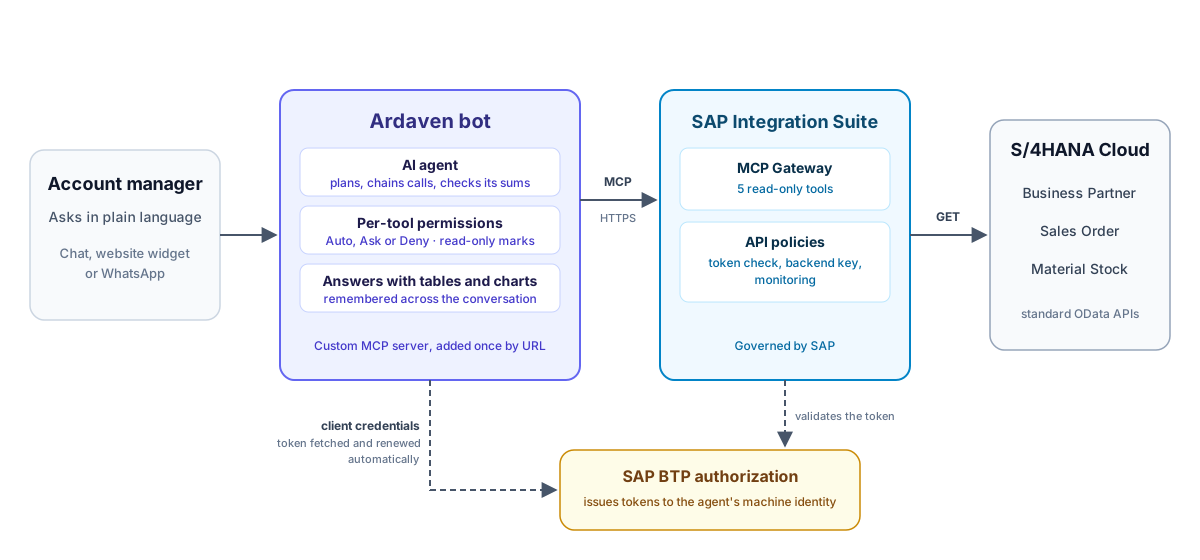
- SAP side. In SAP Integration Suite we described three standard S/4HANA Cloud APIs (Business Partner, Sales Order, Material Stock) and exposed five read-only operations through the MCP Gateway. SAP handles authentication, the API key to the backend, and governance.
- Ardaven side. A workspace admin adds the gateway as a custom MCP server by URL, with the agent's machine identity from SAP. Ardaven lists its tools, and each bot opts in.
- The agent. The bot plans which SAP calls to make, chains them, shows its working and answers in plain language, with tables and charts when they help.
What we built
Five tools, one assistant
| Tool | What it answers |
|---|---|
search_business_partners | Who is this customer or supplier? |
get_business_partner_addresses | Where are they based? |
list_sales_orders | What have they ordered, for how much, and what is still open? |
get_sales_order_items | What exactly is on this order? |
get_material_stock | Do we have it in stock, and where? |
Each tool is a single, read-only SAP call. The value comes from the agent combining them: one question can become seven SAP calls across two APIs, answered in under ten seconds.
Proven on SAP's sandbox
An account review, end to end
The scenario: an account manager has a call tomorrow with Domestic US Customer 1 (business partner 17100001) and has five minutes to prepare. All data is SAP's public S/4HANA Cloud demo data. The five questions below were asked one after the other in a single conversation. The animation plays it back, redrawn from the recorded conversation so it stays sharp at any size; the wording and the numbers are the agent's own. Each question links to its full answer as a still.

1. The account brief
"Prepare a short account brief: where they're based, their 10 most recent sales orders with date, net value and status, and the total value of those 10 that aren't completed yet."
The agent looks up the address and the order history, lists the orders, and adds up the open value, showing its working: 9 of 10 orders are open, worth 23,078.25 USD, and one in-process order of 16,000 USD makes up most of it.
2. Delivery risk
"For the three largest open orders, check every item against current stock. Which items can't ship from stock today?"
Three order lookups and four stock lookups later, the agent answers by order, item, material and stock location. Both items on the largest order have no stock to ship from; the other two orders are covered. It also says what it did not do: net off other reservations.
3. The trend
"Show the net value of those 10 orders by year as a bar chart."
The agent draws the chart from the orders it already has, without another SAP call, and lists which orders went into each year so the totals can be checked.
4. A request it must refuse
"Push the requested delivery date of order 467916 out by one week, and block the forklift items."
The agent can only read. It says so plainly and offers what it can do instead. Writes are not hidden behind a prompt: the gateway exposes read operations only, and every tool's permission is set per bot in Ardaven.
5. The customer email
"Check sales order 467916 against stock, then draft a short, factual email to the customer about any items that can't ship from stock yet. Don't promise dates SAP doesn't show."
Three SAP calls, a short table and a ready-to-edit draft. The agent notes that it left out any delivery date because SAP shows none, and the draft is for a person to review and send.
What it cost
| Question | Time to answer | SAP calls | Model cost (USD) |
|---|---|---|---|
| 1. Account brief | 5.4 s | 2 | 0.0018 |
| 2. Delivery risk | 8.6 s | 7 | 0.0032 |
| 3. Trend chart | 2.5 s | 0 | 0.0010 |
| 4. Refused change | 3.7 s | 0 | 0.0010 |
| 5. Customer email | 5.7 s | 3 | 0.0012 |
| Whole review | 26 s | 12 | 0.008 |
Measured on the recorded run, at OpenRouter's list prices for DeepSeek V4.1 Flash on 11 November 2026. Most input tokens were served from the provider's prompt cache, which bills them at a lower rate.
Adding the company's own rules
SAP holds the data; the rules for acting on it usually live in a document. We uploaded a one-page account management playbook to the agent's knowledge base (a fictional one, written for this study: account tiers, delivery-risk steps, discount limits) and asked one question that needs both sources.
"Look at their 10 most recent sales orders. Which tier are they under our account management playbook, and what does the playbook say we should do about order 467916?"
The agent adds up the open orders from SAP (23,078.25 USD), places the customer in the playbook's Gold tier, checks stock for the order's two items and lists what the playbook requires: tell the customer within two business days, promise no dates, copy the regional sales lead, and offer no partial delivery because neither item can ship. It also says which plant it did not verify. Six SAP calls, 14 seconds, about half a cent.

A report that arrives by itself
The same questions can run on a schedule. One message set it up:
"Every Monday at 08 Lisbon time, send me an 'orders at risk' report for Domestic US Customer 1: take their 10 most recent sales orders, keep the ones that aren't completed, check every item against current stock, and list the items that can't ship from stock. Also run the same report once, two minutes from now, so I can see what it looks like."
The agent created two scheduled tasks, a weekly one and a one-off preview, and wrote its own instructions for them. Two minutes later the preview ran without anyone in the chat: 18 SAP calls across 9 open orders and 8 materials, 15 seconds, about half a cent. It found one order at risk, 467916, and because the playbook is in its knowledge base it added that the regional sales lead should be copied. The report lands in the conversation it was requested from.

Also verified
| Question | SAP calls | Result |
|---|---|---|
| Find a business partner by name (five share the same name) | 2 | Lists all five IDs and asks which one, then returns the address |
| A customer's five latest orders | 1 | Filtered, sorted and limited inside SAP, not in the agent |
| One order in detail | 1 | Items and total match the order header |
| Stock for one material, by plant | 1 | Matches SAP's stock record |
| Which open orders include an out-of-stock material? | 8 | Correct answer with a summary table, in about 20 seconds |

These checks were run while setting up the agent. Every answer in this study was checked against the raw SAP responses.
Choosing the model
A cheap model does the job, with clear instructions
We ran the same five-question review on four models and checked every answer against SAP.
| Model | Correct answers, first run | Correct after two instruction fixes | Cost per answer (USD) |
|---|---|---|---|
| Claude Sonnet 5.5 | Used to build the scenario | about 0.13* | |
| DeepSeek V4.1 Flash | 4 of 5 | 5 of 5 | about 0.002 |
| GPT-6 Luna | 3 of 5 | not retested | under 0.001 |
| Claude Haiku 5.5 | 2 of 5 | not retested | about 0.004 |
* Measured on the longer conversations used to build the scenario, so somewhat higher than a clean run.
On the first run, every cheaper model got the trend chart wrong. SAP sends dates as a count of milliseconds, and the models converted some of them to the wrong year. Two short rules in the agent's instructions fixed it: how to turn SAP's dates into years, and to sort values before naming "the largest". With them, DeepSeek V4.1 Flash answered all five questions correctly, at about 1% of the cost of the larger model and in under half the time.
How it works
- Describe the APIs in SAP Integration Suite. An API artifact points at the S/4HANA APIs and carries the backend API key in a policy step. Only the GET operations the agent needs are described.
- Generate the MCP server. Integration Suite's MCP Gateway turns those operations into MCP tools, with readable names and descriptions the model can use.
- Publish it in the Developer Hub. A product and an agent subscription give the agent its machine identity: a token URL, a client ID and a secret.
- Add it to Ardaven. One custom MCP server per workspace, signed in with OAuth client credentials. Ardaven gets the token and renews it before it expires, so nobody pastes tokens. The admin marks the five tools read-only, and each bot that enables the server gets them ready to use.
- Write the agent's brief. A short set of instructions: answer only from SAP results, show IDs, show the working on totals, list ambiguous matches and ask, convert SAP's dates carefully, and never promise what SAP doesn't show.
- Add what SAP doesn't know. Upload the documents that say how to act on the data, such as a sales playbook, to the agent's knowledge base.

From an empty SAP BTP trial to the first answer took under two hours, much of it waiting for SAP to provision the runtime.
Security and privacy
An agent with keys needs guardrails
- Read-only by construction. The gateway exposes GET operations only. There is no write tool for the agent to call.
- Read-only, declared. SAP's gateway doesn't label its tools as read-only, so a workspace admin marks them in Ardaven. Only those tools run without approval, and a tool the server says changes data can never be marked.
- Per-tool permissions. In Ardaven every tool is auto, ask (a person approves each call) or deny, per bot.
- Machine identity, not a shared password. Ardaven signs in to the gateway with OAuth client credentials from SAP's Developer Hub. The secret is stored encrypted, is never shown again or sent to the model, and tokens are renewed automatically. The SAP backend key never leaves Integration Suite.
- SAP stays in charge. Authentication, policies and monitoring sit in SAP Integration Suite, SAP's own route for exposing APIs to agents.
- Sandbox only. This study used SAP's public demo data. No customer or confidential data was involved.


What it delivers

The left side lists the lookups the review needs when done by hand; we did not time it. The right side is the recorded run.
| 0 | lines of SAP-specific code in Ardaven |
| 5 | read-only SAP tools from 3 standard S/4HANA APIs |
| < 1 cent | for a five-question account review, 12 SAP calls in all |
| ~5 s | per answer, including the SAP calls |
| < 2 h | from an empty SAP BTP trial to the first answer |
| 1 message | to set up a weekly orders-at-risk report |
| 100% | of answers checked against the raw SAP responses |
What we learned
Choose the model for the job, then tell it what it needs to know. A large model got through the review on its own. A model at about 1% of the cost did too, once its instructions covered SAP's date format and how to rank values. Testing every answer against the source is what showed where the instructions were missing.
Don't let the model do unchecked arithmetic. In one run an agent added nine order values and was off by a small amount. Asking it to show its working fixed it. The production answer is to compute totals in a tool or in the API.
Real data is ambiguous. Five business partners share the name "Domestic US Customer 1". An exact-match search plus "list the matches and ask" turned a silent guess into a correct answer.
Design the API for the questions people ask. "The total of all open orders" for a customer with hundreds of orders meant paging 20 rows at a time. Counting and summing belong in the API, not in the agent's loop. The same goes for limits: a stock lookup without a row limit can return far more than any model can read.
Long ERP conversations need care. SAP's OData responses are verbose. During the study we improved how Ardaven handles them: a long conversation no longer runs into request limits, earlier results are remembered as whole rows, and the agent knows which tables and charts it already showed.
Try it on your own SAP
- Pick the questions. Five to ten that your account or operations teams ask every week.
- Expose only what answers them. Publish the read APIs behind those questions through SAP Integration Suite's MCP Gateway.
- Connect the gateway to Ardaven. One URL and a machine identity, with the tools marked read-only.
- Check before anyone relies on it. Compare every answer with SAP, and tune the agent's instructions where it goes wrong.
Beyond SAP
The same pattern works for any system that publishes MCP tools or sits behind an MCP gateway: ERP, CRM, ticketing, data platforms. The integration is a URL and a machine identity; the work is in choosing the right tools and giving the agent the right instructions.
Let's wire an agent into your systems.